2. How do I give a benefit-in-kind to a person as repeating?

 3:06
"How do I give a fringe benefit to a person as repeating?"
When your company pays for a benefit that a person uses outside of work, it's considered a "Fringe benefit". In some cases, you may want to set it up as a repeating "Fringe benefit", so it's added to the person's paystub every payday.
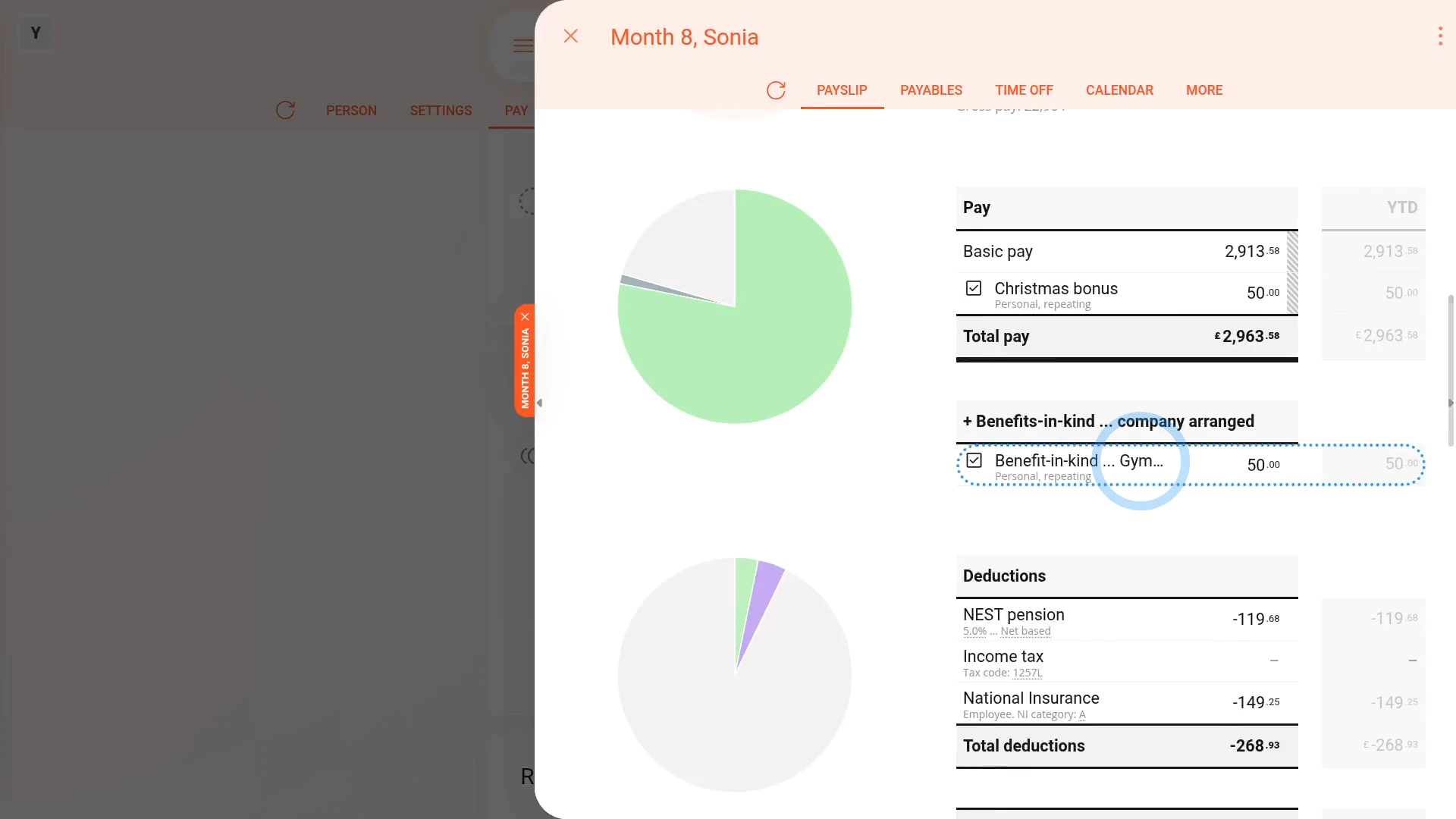
To add or remove a person's repeating "Fringe benefit":
- First, select the person who's getting the repeating "Fringe benefit" on: "Menu", then "People"
- To make a new repeat payable, go to: "Pay", then "Pay settings"
- And scroll down to the "Repeat payables ... personal" heading.
- Then tap: New repeat payable
- Next, tap: Fringe benefit
- Then type in how much the "Fringe benefit" is worth, and tap: Next
- Then decide from the fringe benefit suggestions, or tap "type directly" (at the top) to type in your own short description of the repeating "Fringe benefit"
- Next, select the time frame for the: "Amount type"
- By default, "Arranged by" is already set to: "Company"
- If there's a co-pay, or an amount that the person's agreed can be deducted from their pay, enter that also in: "Employee deducted co-pay"
- Then tap: Save
- Then on the repeat payable, tap the "see on paystub" link.
- You'll now see an amount showing under: "Fringe benefits ... company arranged"
- And if you hover your mouse over the amount, you'll see a breakdown of the calculation.
- Then if you tap the "Next paystub" circle, you'll see the same amounts repeated on every payday. Including: "Fringe benefit"
- If you later decide you want to remove, or stop the repeating "Fringe benefit", tap its "Edit" button:
- Then scroll down and tap the "Advanced" heading, and set the "Ends on" date.
- And finally, once you tap Save, if the date you set ends the repeating "Fringe benefit" before the "pay period" starts, you'll see it disappear. But it's still there on previous months.

Also remember that:
- A "Fringe benefit" increases the person's tax, and doesn't increase the person's in-the-hand pay.
- However, the person still gains by receiving the non-cash benefit.
To learn more:
- About how to do a one-time "Fringe benefit", watch the video on: One-time fringe benefit
- And to learn more about deleting or un-deleting a repeat payable, watch the video on: Deleting a repeat payable
 One-time fringe benefit
And that's it! That's all you need to do to set up a repeating "Fringe benefit" for a person!
1. How do I give a benefit-in-kind to a person as a one-off3. How do I add a benefit-in-kind as company arranged
www.1st.money/help/Expenses/Benefits-in-kind/2._How_do_I_give_a_benefit-in-kind_to_a_person_as_repeating