How do I check, or fix the spelling of my name?
 1:39
"How do I check, or fix the spelling of my name?"
It's important to check that your full name's correct. It's used when submitting government taxes, and for employment documents.
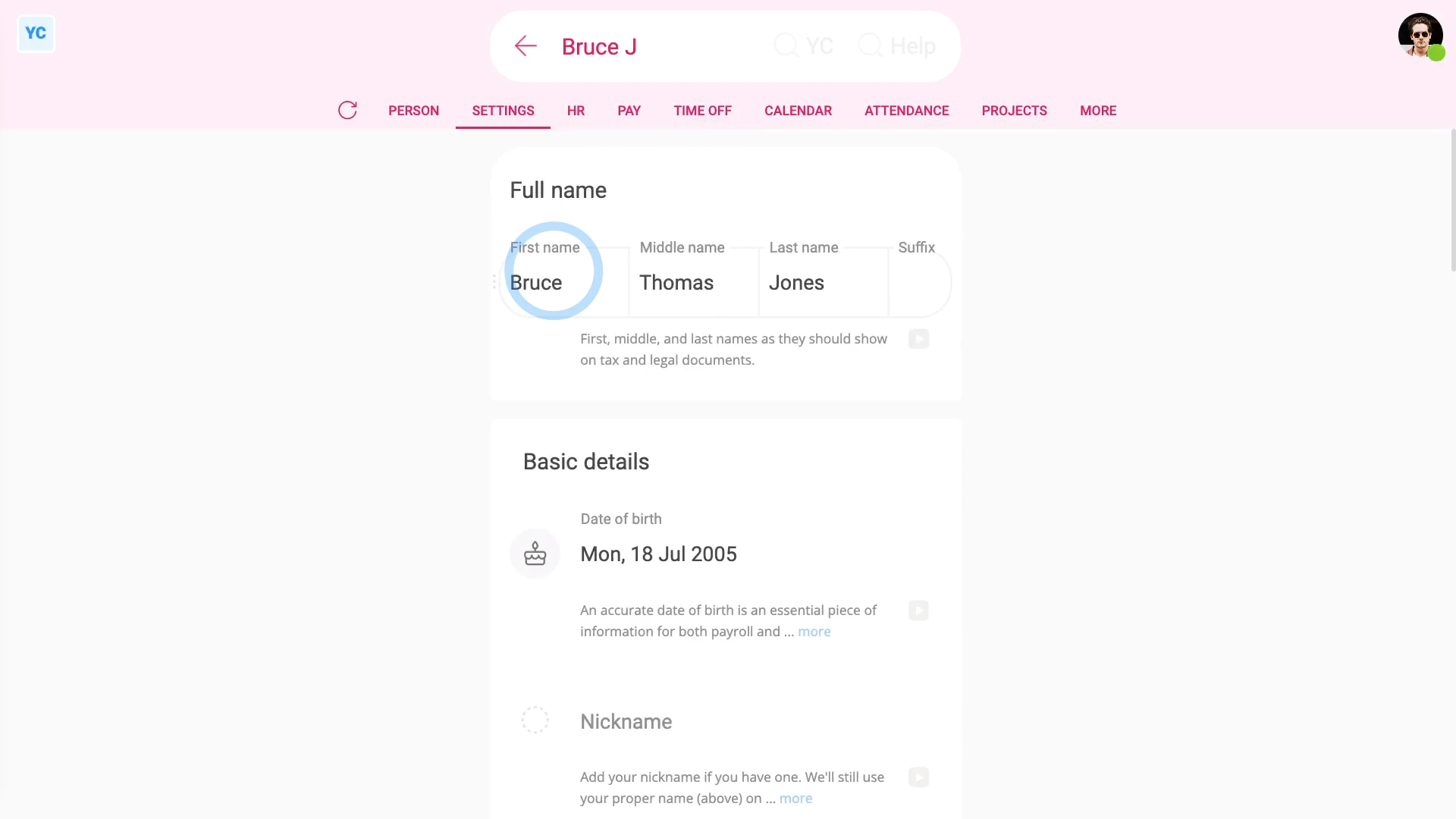
To check your full name:
- First, open yourself on: "Menu", then "Me"
- Then tap: "Settings", then "Person settings"
- Check, and fix if required, your full name.
- Including your middle name, and also any suffix (on the end).
- And finally, tap: Save

You may notice:
- Occasionally, there's two people with the same first name.
- If so, it adds their surname initial to their names each, so you can tell them apart.
To set a nickname for yourself:
- First, open yourself on: "Menu", then "Me"
- Then tap: "Settings", then "Person settings"
- Type in your nickname.
- And tap: Save
- And finally, when you open the "People" list, you'll see that you're now listed by your nickname.
Keep in mind that:
- Even if you're listed in the "People" list by your nickname, official docs still use your full name.
- Including both tax submission and employment documents that still always use your full name.
And that's it! That's everything you need to know about setting your name!
www.1st.money/uk/help/People/How_do_I_check,_or_fix_the_spelling_of_my_name