Import 1. How do I import people when switching from my old payroll?

 5:36
"How do I import people when switching from my old payroll?"
When you're switching from an old payroll platform, over to 1st Money, you can import all your people with your latest payday FPS file.
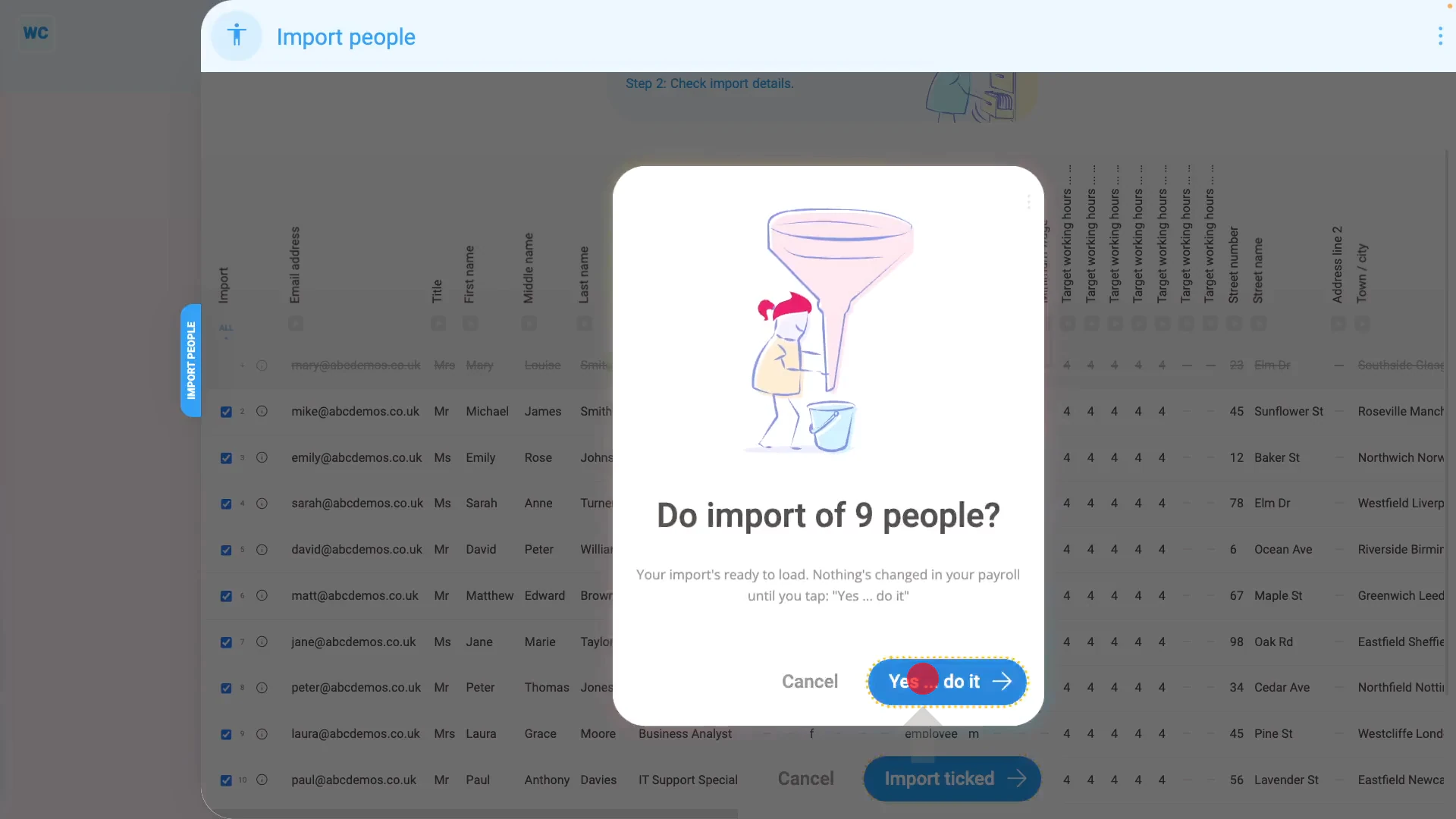
To import people using your latest payday FPS file:
- First, if you're only practising import people, create a new org on: "Menu", then "Orgs"
- Then tap Set up another org, and then: Create new org
- Next tap: "Import people"
- You're now on step 1, so tap: Choose File
- Next, select your latest payday FPS file.
- However, if you're not sure where to find your latest payday FPS file, tap: Find XML (FPS) file
- And you'll see a list of some of the UK's most common payroll platforms.
- Once you find the name of your old payroll, tap it, and follow the instructions on how to download your latest payday FPS file from them.
- Once you've got your latest payday FPS file, tap Choose File, and upload it.
- You're now on step 2, and you'll be shown a list of all the rows of people you're about to import.
- If you hover your mouse over the info circle you'll be shown more details about each person.
- Also, if at any point, you'd like to cancel, tap Cancel, and nothing's changed in your org.
- In many cases, you'll see entire columns that're missing info from your import. For example, email and job title.
- To add missing info, tap Get CSV, and then: Download CSV
- Then open the downloaded CSV file in your default spreadsheet software.
- And type (or paste) in all your changes into your downloaded CSV.
- Once you've finished adding your changes, save the CSV.
- If there's any columns that you're not sure what to enter, tap Get CSV, and then: Read about CSV columns
- And you'll see all the notes about what goes into each column.
- Next, to upload your saved CSV file, tap Cancel to go back to step 1.
- Then tap Choose File, and upload your saved CSV file.
- And you'll now see that the columns you filled in, like email and job title now show up.
- However, there may still be other columns, like "Date joined" or "Date of birth" that still need to be filled in.
- So keep on doing the process of adding info to your CSV, saving it, uploading it, and checking it. And repeat the process until you feel like it's all there.
- Then before importing. If there's any people in the list that you'd like to not import, tap the tick on that row, to untick them.
- And then once you're ready, tap Import ticked, and: Yes ... do it
- And now you'll see your newly imported people highlighted in yellow.
- And finally, if you're sure it's your final import, you'll see it's all ready for sending out email invites. And after that, sending out onboarding docs.

To learn more:
- About sending out email invites, watch the video on: Sending invite emails after import
- And to learn about sending out onboarding docs, watch the video on: Sending onboarding docs after import
 Sending invite emails after import
You may notice:
- That if you're still learning about importing people, it can be a good idea to always practise importing into a new org.
- You can do your import into the new org, then tap around checking everything is how you'd like it to be.
- If anything's not quite right, you can close the new org, and make another new org, as many times as you like.
- To learn more about closing orgs, watch the video on: Closing your org
For advanced usage:
- You'll find that doing all your changes in a CSV file, and then importing it, is much faster than entering them by hand.
- Especially if you're importing hundreds (or thousands) of people.
Keep in mind that:
- The payday FPS file is an XML file that every kind of UK payroll software uses to send payroll to HMRC.
- Regardless of whether your old payroll's online, or installed, every kind of UK payroll software uses a payday FPS file to send payroll to HMRC.
- If you can't find your old payroll in the list, contact their support and ask them: "How do I get my latest payday FPS file?"
- Hopefully their support can tell you where to find it, free of charge.
- It's guaranteed that every UK payroll software uses payday FPS. It's required by HMRC.
And that's it! That's everything you need to know about importing people when switching from your old payroll!
How do things look when a person's got payroll admin permissionsImport 2. How do I send invite emails to people, after importing
www.1st.money/uk/help/People/Import_1._How_do_I_import_people_when_switching_from_my_old_payroll