How do I turn on unpaid time off for my salaried people?

 2:41
"How do I turn on unpaid time off for my salaried people?"
Normally, salaried people only get "Paid time off", which means their "Unpaid time off" requests are normally disabled.
If unpaid time offs were turned on for salaried people, it'd result in a pay reduction for each "Unpaid time off". Which would go against the generally accepted norm of salaries being the same fixed amount each payday.
However, sometimes you may still want the flexibility of offering "Unpaid time off" for your salaried people. In which case, salaried people's pay isn't to be protected from the pay reduction of each unpaid time off.
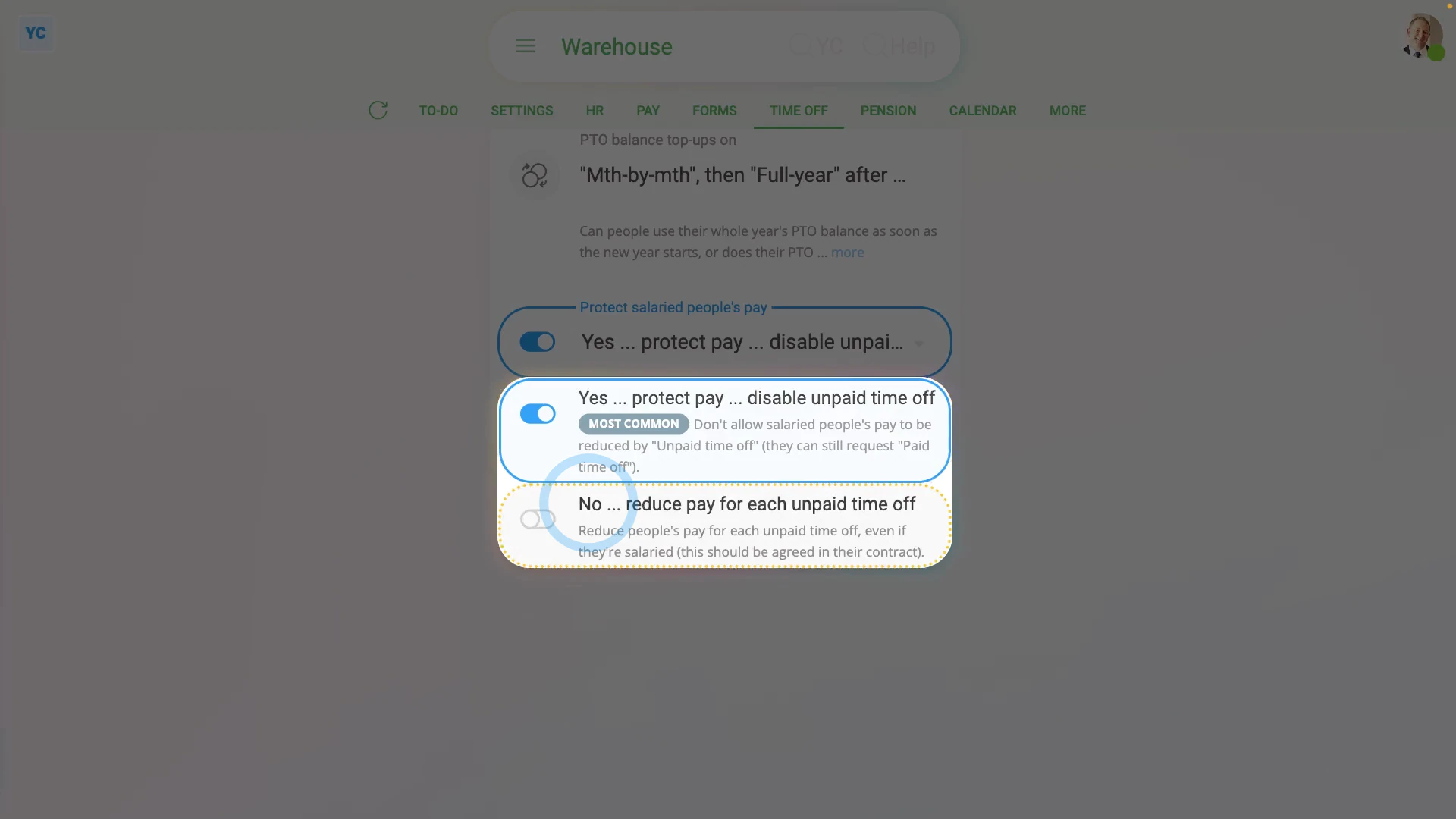
To turn off a payroll group's "Protect salaried people's pay" setting:
- First, select the payroll group on: "Menu", then "Payroll groups"
- Then tap: "Time off", then "Time off settings"
- Next, scroll down to the "Advanced" heading, and tap: "Protect salaried people's pay"
- If you keep it set to "Yes", your salaried people continue to have "Paid time off", but can't request: "Unpaid time off"
- In which case, when a salaried person in the payroll group requests "Unpaid time off", there's a note explaining that it's disabled.
- If you change it to "No", your salaried people can now request both paid and unpaid time off, the same as hourly paid workers.
- However, your salaried people are now going to have a resulting pay reduction of each: "Unpaid time off"
- So it's advised to have the option for "Unpaid time off" included in each salaried person's contract.
- Then tap: Save
- Now when a salaried person in the payroll group requests "Unpaid time off", it's no longer disabled.
- To see the "Unpaid time off", go to the person's time off list, and you'll see it marked as: "Unpaid"
- And finally, near the top of the list, you'll see the person's total "Unpaid time off" for the year, so far.

Keep in mind that:
- Non-salaried people, like hourly paid workers, are unaffected by the "Protect salaried people's pay" setting.
- All hourly paid workers can always request both paid and unpaid time off.
And that's it! That's everything you need to know about turning on "Unpaid time off" for your salaried people!
www.1st.money/uk/help/Time_Off/How_do_I_turn_on_unpaid_time_off_for_my_salaried_people