4. How do I make an employee arranged benefit-in-kind?

 2:45
"How do I make an employee arranged fringe benefit?"
An employee arranged fringe benefit, that's paid by the company, is taxed with National Insurance (Class 1) only.
To make an employee arranged fringe benefit:
- First, select the person who's getting the employee arranged fringe benefit, on: "Menu", then "People"
- Next, go to: "Pay", then "Pay settings"
- And scroll down to the "Repeat payables ... personal" heading.
- Then tap: New repeat payable
- Next, tap: Fringe benefit
- Then decide from the fringe benefit suggestions, or tap "type directly" (at the top) to type in your own short description.
- Then type in how much the "Fringe benefit" is worth, and tap: Next
- Next, select the time frame for the: "Amount type"
- Next, change "Arranged by" to: "Employee"
- Then scroll down and tap the "Advanced" heading.
- If there's a co-pay, or an amount that the person's agreed can be deducted from their pay, enter that also in: "Employee deducted co-pay"
- Then tap: Save
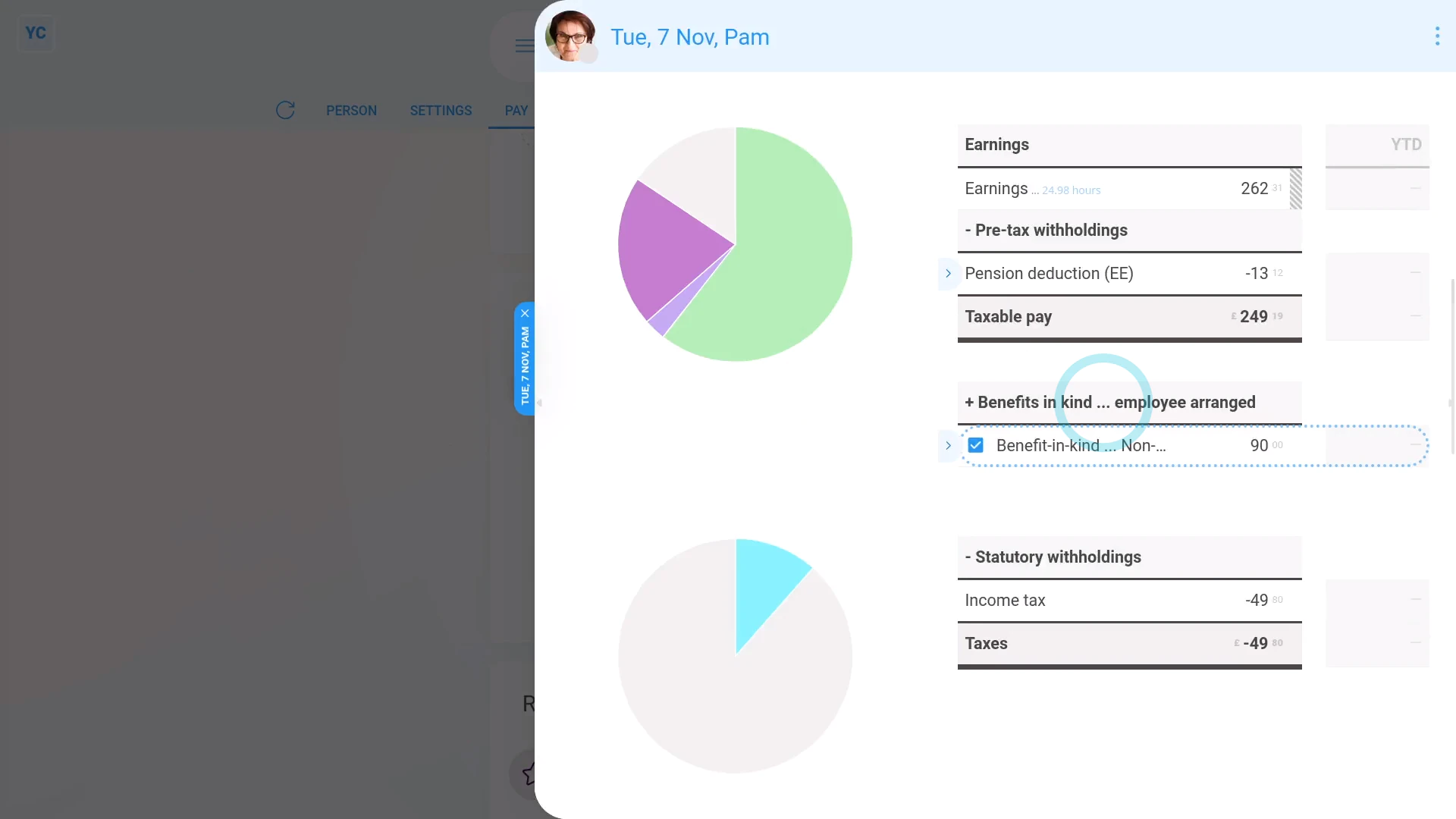
- Now, to see how it shows up on the person's paystub, below the repeat payable, tap the "see on paystub" link.
- You'll now see an amount showing under: "Fringe benefits ... employee arranged"
- There may have been a co-pay, or an amount that the person's agreed can be deducted from their pay. If so, you'll also see that amount showing as: "Employee deducted co-pay"
- And finally, if you hover your mouse over the amounts, you'll see a breakdown of their calculations.

Keep in mind that:
- As a "Fringe benefits ... employee arranged", the benefit is taxed by "National Insurance (Class 1)" only.
- Which results in the person paying slightly lower taxes, compared to a: "Fringe benefits ... company arranged"
- Also, because it's a fringe benefit, there's no change to the person's in-the-hand pay (besides the tax adjustment).
To learn more:
- About a "Fringe benefits ... company arranged", watch the video on: Company arranged benefit
- And to learn more about deleting or un-deleting a repeat payable, watch the video on: Deleting a repeat payable
 Company arranged benefit
And that's it! That's everything you need to know about adding an employee arranged fringe benefit!
www.1st.money/help/Expenses/Benefits-in-kind/4._How_do_I_make_an_employee_arranged_benefit-in-kind