4. How do I make an employee arranged benefit-in-kind?

 2:44
2:44
"How do I make an employee arranged benefit-in-kind?"
An employee arranged benefit-in-kind, that's paid by the company, is taxed with National Insurance (Class 1) only.
To make an employee arranged benefit-in-kind:
- First, select the person who's getting the employee arranged benefit-in-kind, on: "Menu", then "People"
- Next, go to: "Pay", then "Pay settings"
- And scroll down to the "Repeat payables ... personal" heading.
- Then tap: New repeat payable
- Next, tap: Benefit-in-kind
- Then decide from the benefit-in-kind suggestions, or tap "type directly" (at the top) to type in your own short description.
- Then type in how much the "Benefit-in-kind" is worth, and tap: Next
- Next, select the time frame for the: "Amount type"
- Next, change "Arranged by" to: "Employee"
- Then scroll down and tap the "Advanced" heading.
- If there's a co-pay, or an amount that the person's agreed can be deducted from their pay, enter that also in: "Employee deducted co-pay"
- Then tap: Save
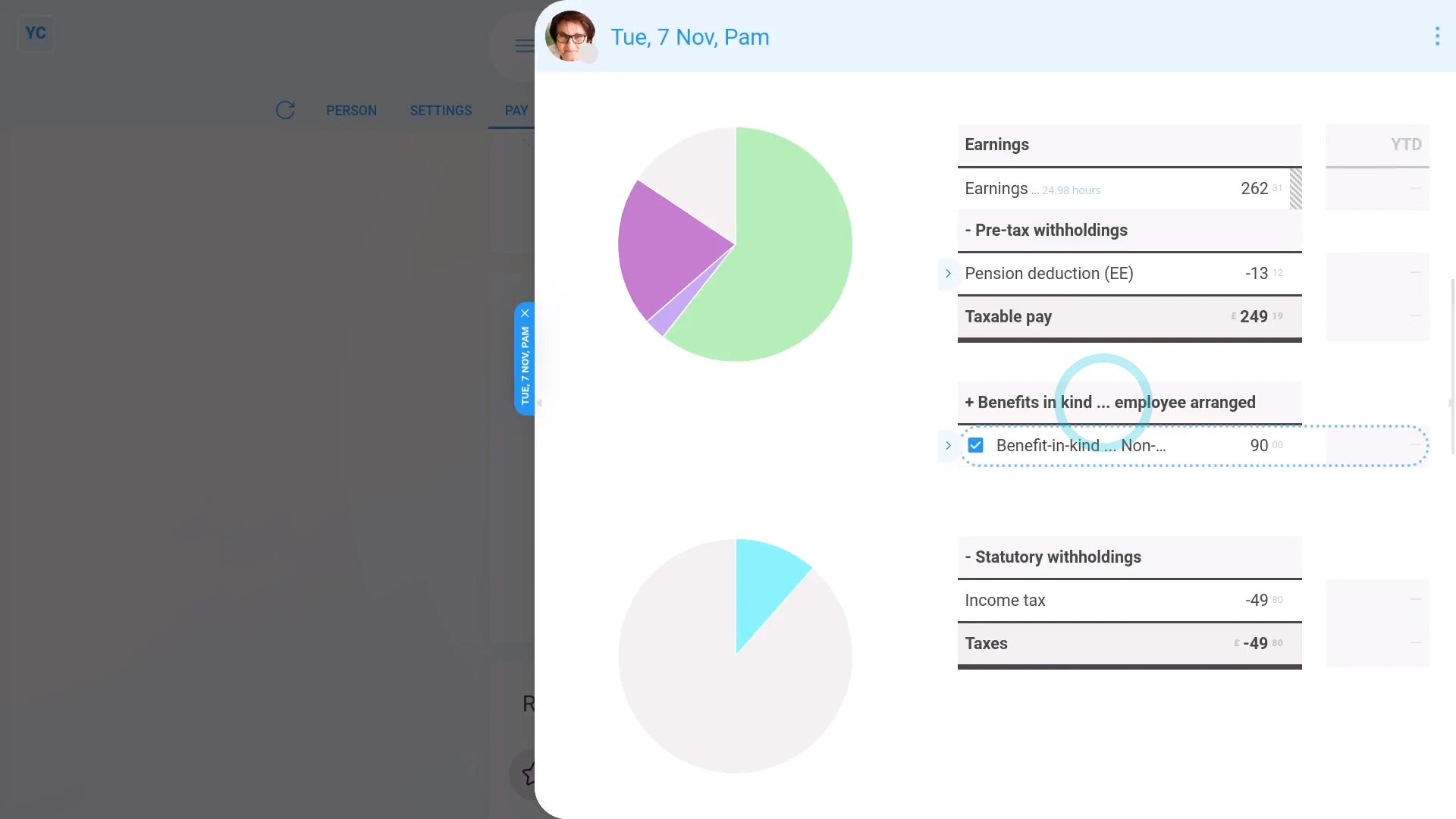
- Now, to see how it shows up on the person's payslip, below the repeat payable, tap the "see on payslip" link.
- You'll now see an amount showing under: "Benefits-in-kind ... employee arranged"
- There may have been a co-pay, or an amount that the person's agreed can be deducted from their pay. If so, you'll also see that amount showing as: "Employee deducted co-pay"
- And finally, if you hover your mouse over the amounts, you'll see a breakdown of their calculations.

Keep in mind that:
- As a "Benefits-in-kind ... employee arranged", the benefit is taxed by "National Insurance (Class 1)" only.
- Which results in the person paying slightly lower taxes, compared to a: "Benefits-in-kind ... company arranged"
- Also, because it's a benefit-in-kind, there's no change to the person's in-the-hand pay (besides the tax adjustment).
To learn more:
- About a "Benefits-in-kind ... company arranged", watch the video on: Company arranged benefit
- And to learn more about deleting or un-deleting a repeat payable, watch the video on: Deleting a repeat payable
 Company arranged benefit
And that's it! That's everything you need to know about adding an employee arranged benefit-in-kind!
www.1st.money/uk/help/Expenses/Benefits-in-kind/4._How_do_I_make_an_employee_arranged_benefit-in-kind